
Greenhouse integration
Contents
- What can you do with a Dado-Greenhouse integration?
- What data is exchanged between Dado and Greenhouse?
- How to set up the Greenhouse integration
- When will new hires be synced across from Greenhouse to Dado?
What can you do with a Dado-Greenhouse integration?
The Dado <> Greenhouse integration allows you to use Greenhouse as a source for importing users and updating user data in Dado. For instance, you can import newly hired team members into Dado, including any relevant data which could be needed for your preboarding and onboarding process.
What data is exchanged between Dado and Greenhouse?
Greenhouse data accessible to Dado
Dado connects to Greenhouse via their Harvest API, using an API key generated by a particular Greenhouse user. Dado can in theory access any data in Greenhouse accessible to this user.
In practice, which data is synced to Dado is determined by you, when you set up Greenhouse as an import source and select which fields should be imported.
Dado data accessible to Greenhouse
Dado does not sync data back to Greenhouse, so no data held in Dado would be exposed to Greenhouse.
Greenhouse Harvest API Scopes needed by Dado
- Applications: List applications
- Candidates: List candidates
- Custom Fields: List custom fields
- Jobs: List jobs
- Offers: List offers
- Users: List users
How to set up the Greenhouse integration
Time required: 5 minutes
Pre-requisites: a Greenhouse account with Site Admin permissions.
- Go to Settings > Integrations in Dado
-
Click on the Greenhouse card and click Connect with Greenhouse
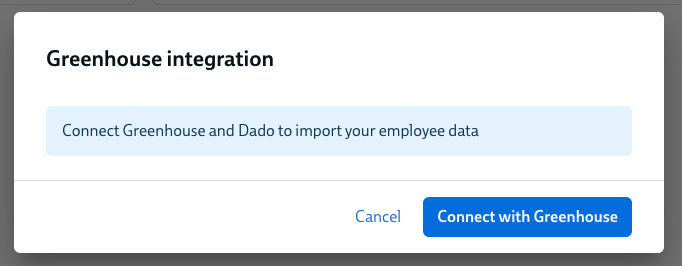
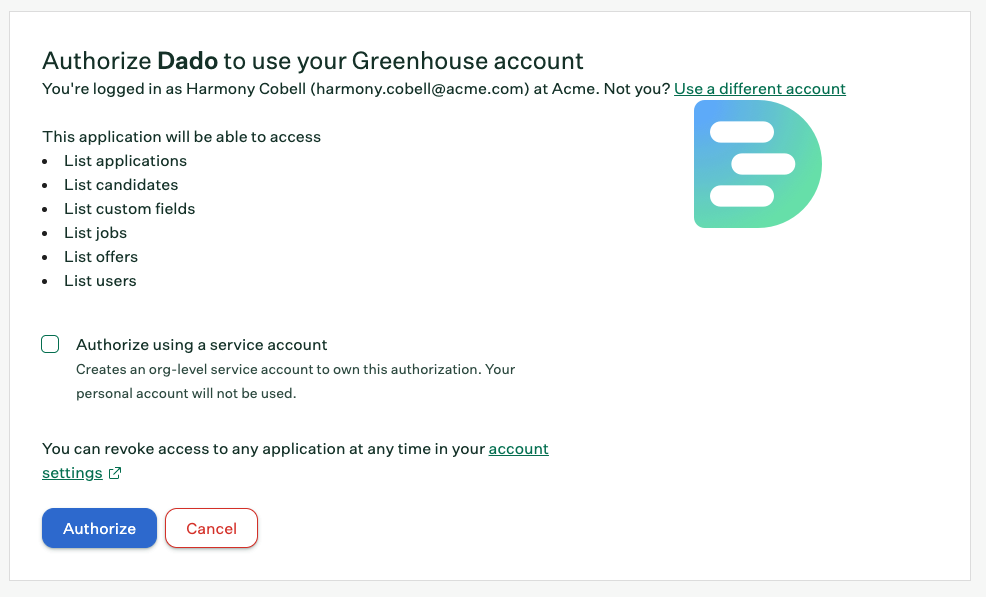
- You will now be taken to Greenhouse. Check the Authorize using a service account checkbox, then click the blue Authorize button.
-
If you are not currently logged into Greenhouse, you will have to log in before you see the Authorize using a service account checkbox
-
- You will now be redirected to Dado and shown a confirmation that the integration is set up.
You're now ready to set up Greenhouse as an import source, and start importing data into Dado!
When will new hires be synced across from Greenhouse to Dado?
Dado's Greenhouse integration will sync across candidates from Greenhouse as soon as they have been marked as Hired.